
Into The Hive equipment upgrades, Mastery and Augment slots
Last updated:
Improve your gear with Cash and ore, then build its Mastery through mission use to open additional Augment slots. Equipment level, item Mastery, and account Rank progress separately.
Open Equipment > Gear, select an owned item, and press Upgrade after checking its Cash and ore requirements. Earn that item's Mastery by using it in missions. AR-01, AR-03, PI-01, GL-01, Heavy Cannon, and Blast Grenade have one Augment slot at Mastery 1, a second at Mastery 4, and a third at Mastery 8.
Equipment level and Mastery are separate
Equipment has two separate growth tracks, alongside your account's Rank:
| Progression | How it advances | What it affects |
|---|---|---|
| Equipment level | Cash and ore upgrades | Item stats |
| Equipment Mastery | Item use in missions | Augment slot unlocks |
| Account Rank | Rank XP | Account progression |
Resource upgrades improve the stats listed in the item's upgrade preview. Depending on the equipment, those changes include damage, magazine capacity, health, radius, or duration.
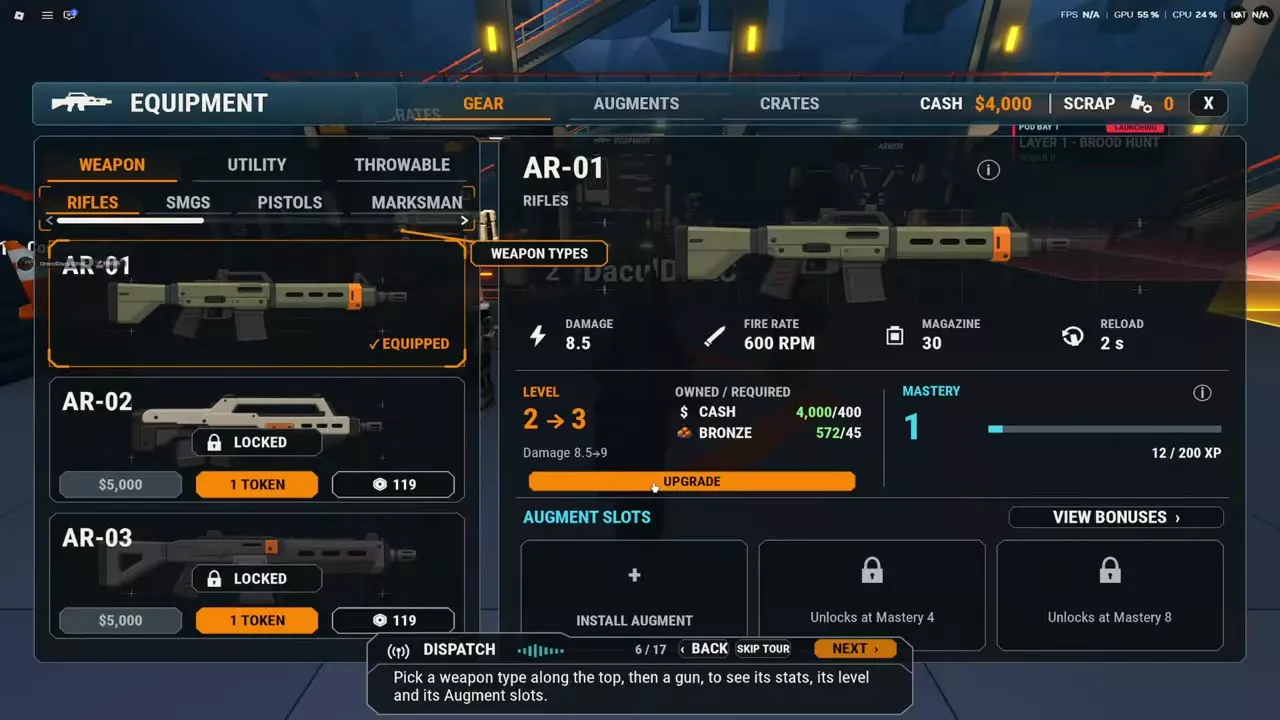
Mastery belongs to the individual item. For example, AR-01 can be upgraded from equipment Level 1 to Level 3 while remaining at Mastery 1. Buying Level 4 does not satisfy a slot that requires Mastery 4.
If your goal is stronger item stats, purchase its equipment upgrades. If your goal is another Augment slot, use that specific item in missions to build Mastery. See account Rank progression for the separate Rank XP track.
Upgrade equipment with Cash and ore
Own the item and collect every resource required for its next level before upgrading.
- Open Equipment from the lobby menu, then select Gear.
- Choose the equipment category and select your owned item. For a rifle, open Weapon > Rifles.
- Read the current level, next level, stat changes, and all Owned / Required resource amounts.
- Press Upgrade to pay the listed resources and increase the equipment level.
- Read the updated panel before buying the next upgrade; its cost and stat changes belong to that next step.
Cash and ore requirements are paid together. For AR-01, Level 1 → 2 costs 250 Cash and 30 Bronze, raising damage from 8 to 8.5. Level 2 → 3 costs 400 Cash and 45 Bronze, raising damage to 9. Together, those two upgrades cost 650 Cash and 75 Bronze.
Read configured stats and upgrade previews separately
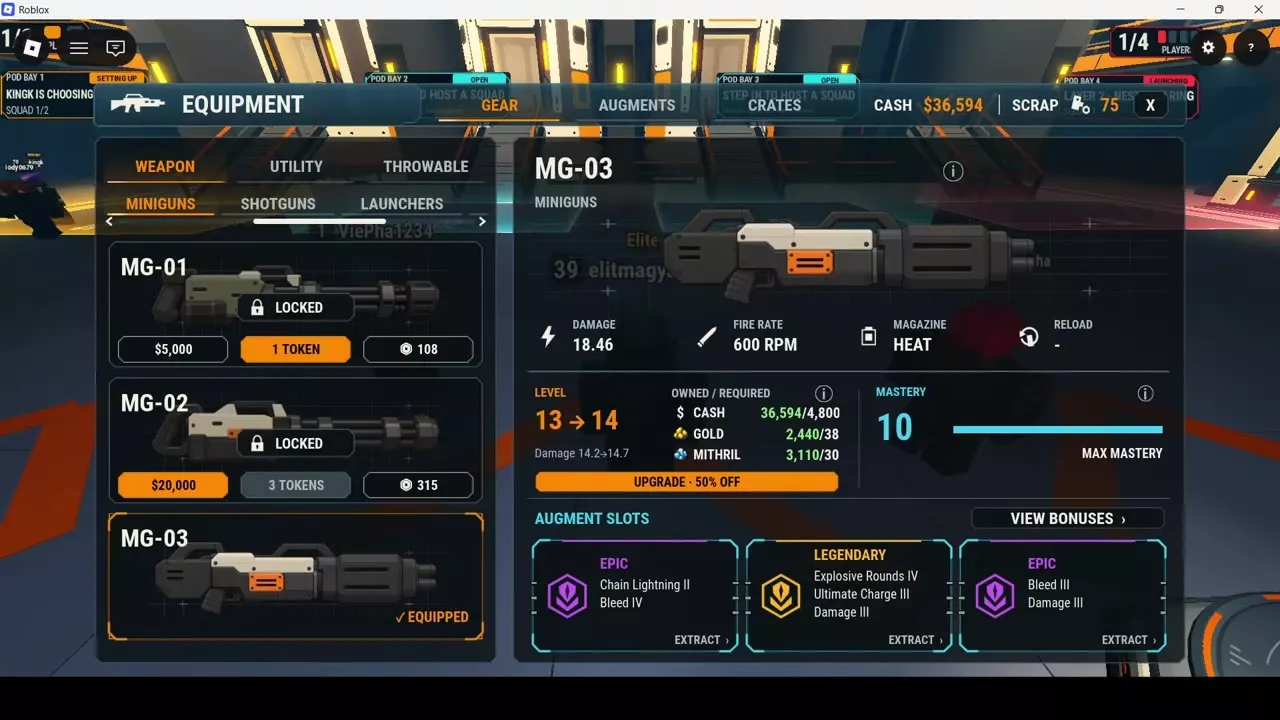
Equipped Augments affect the current configuration's displayed stats. Read that panel separately from the level-up preview. For example, an Augmented Level 13 MG-03 displays 18.46 damage, while its Level 13 → 14 upgrade preview reads 14.2 → 14.7. Comparing 18.46 directly with 14.7 would mix the configured stat with the upgrade preview.
Upgrade discounts
With Mastery Booster, every equipment upgrade costs half the Cash and half the ore. Both resource discounts apply permanently across equipment; use the requirements displayed for your next upgrade.
Earn and check Mastery
- Equip the weapon, utility item, throwable, or Demolition tool you want to progress.
- Use it during missions.
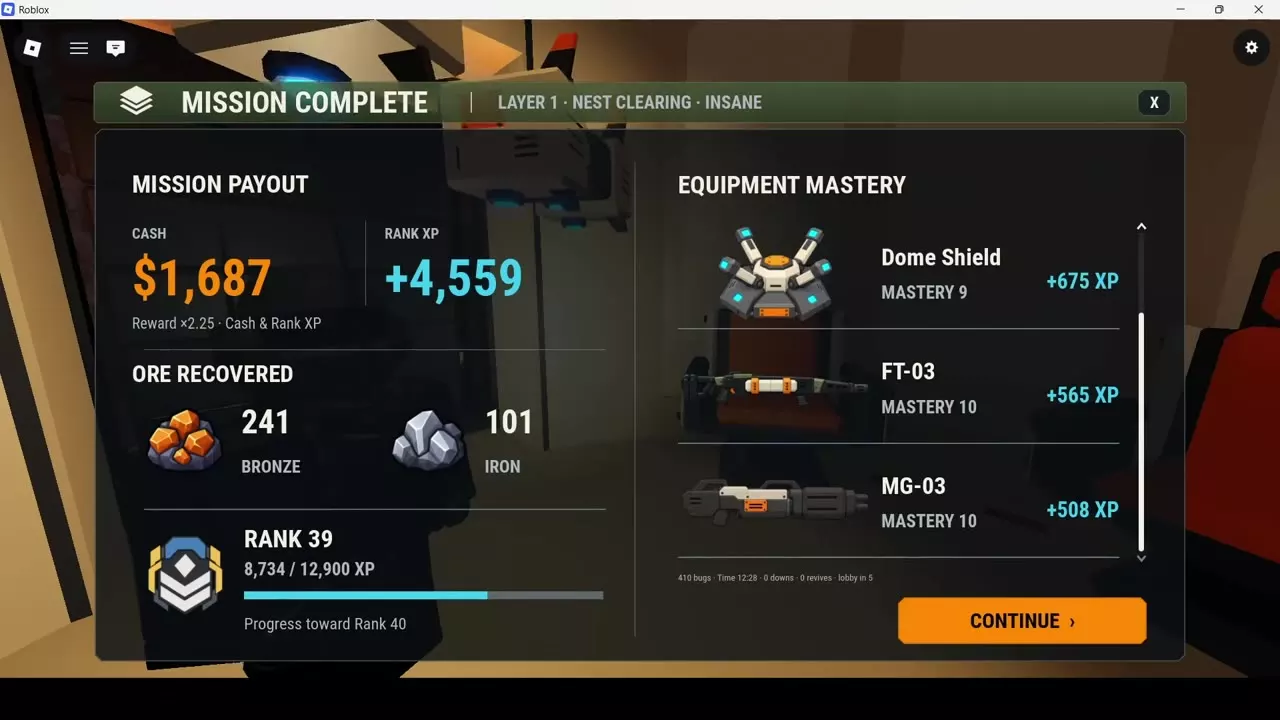
- After completing a mission, read Equipment Mastery on the results screen. Each listed item receives its own XP award.
- Scroll down the results list to see equipment farther down the list.
- Back in the lobby, open Equipment > Gear and select the item to check its Mastery level and XP bar.
Read the Mastery level and XP fraction together. A Mastery 9 Dome Shield at 1,980/3,000 XP, for example, has progress toward its next Mastery level. Its equipment level is separate: that configuration is Level 18, with a Level 19 resource upgrade available.
From the November 14, 2026 Demolition update, Pickaxe, Drill, and C4 all support equipment levels and Mastery. Select these tools through the Demolition slot in Loadout. Drill moved there from Utility in that update.
Unlock Augment slots
Select an item in Equipment > Gear and read its Augment Slots. Raise that item's Mastery to the requirement on the locked slot, then select the available slot to choose a compatible stored Augment.
| Equipment | Slot 1 | Slot 2 | Slot 3 |
|---|---|---|---|
| AR-01 | Mastery 1 | Mastery 4 | Mastery 8 |
| AR-03 | Mastery 1 | Mastery 4 | Mastery 8 |
| PI-01 | Mastery 1 | Mastery 4 | Mastery 8 |
| GL-01 | Mastery 1 | Mastery 4 | Mastery 8 |
| Heavy Cannon | Mastery 1 | Mastery 4 | Mastery 8 |
| Blast Grenade | Mastery 1 | Mastery 4 | Mastery 8 |
For these items, Mastery 4 gives you two total slots, and Mastery 8 gives you three total slots. Progress the item whose slot you want: another item's Mastery and resource-funded equipment levels do not meet its requirement.
Drill before the Demolition update
Before November 14, 2026, Drill was a Utility item with one available slot at Mastery 1, two at Mastery 4, and three at Mastery 8. That version had a separate Mastery track but no resource-funded equipment levels.
Mastery caps and the Booster
Max Mastery does not stop resource upgrades
MG-03, FT-03, and Lure Beacon reach Max Mastery at 10. Each still has a resource-funded upgrade available in the following configurations:
| Equipment | Mastery | Equipment upgrade |
|---|---|---|
| MG-03 | 10 · Max Mastery | Level 13 → 14 |
| FT-03 | 10 · Max Mastery | Level 10 → 11 |
| Lure Beacon | 10 · Max Mastery | Level 16 → 17 |
Mission results still display awarded Mastery XP for these items at Mastery 10. That XP award does not indicate progression to Mastery 11.
Mastery Booster benefits
The 199 Robux Mastery Booster permanently doubles Mastery XP for every weapon and piece of equipment. It suits players developing several items because its XP benefit follows every item they progress, alongside the upgrade discounts described above.
Keep the XP types separate when choosing a pass: Mastery Booster doubles equipment Mastery XP, while VIP adds 25% account Rank XP. Compare the other benefits in the game pass directory.
Item progression tables and Augment management
Open the relevant equipment directory, then choose an item for its level stats and upgrade requirements:
- Weapons — firearm and melee entries, including individual progression tables.
- Utility equipment — turrets and Dome Shield.
- Throwables — grenades, mines, axes, and Lure Beacon.
- Demolition tools — Pickaxe, Drill, and C4.
Once a slot is available, use Augment management to install a compatible Augment, compare replacements, or extract and transfer an existing one.